
The first night we brought my nephew home, my sister-in-law sat in the rocking chair next to his crib and just… watched him breathe. For two hours. She wasn’t doing anything else. Not reading, not on her phone. Just watching a tiny person’s chest rise and fall, convinced that the moment she looked away something would happen.
This is the actual problem baby monitors are solving. Not “I want to see what the baby is doing.” It’s “I need to know the baby is still breathing so that I can walk to another room without a full anxiety spiral.” Every feature, every spec, every price premium exists in service of that one thing. The monitors that understand this are the ones worth buying. The ones that have lost the plot are the ones that give you a sleep-quality score for your three-week-old and charge you $9 a month for the privilege.
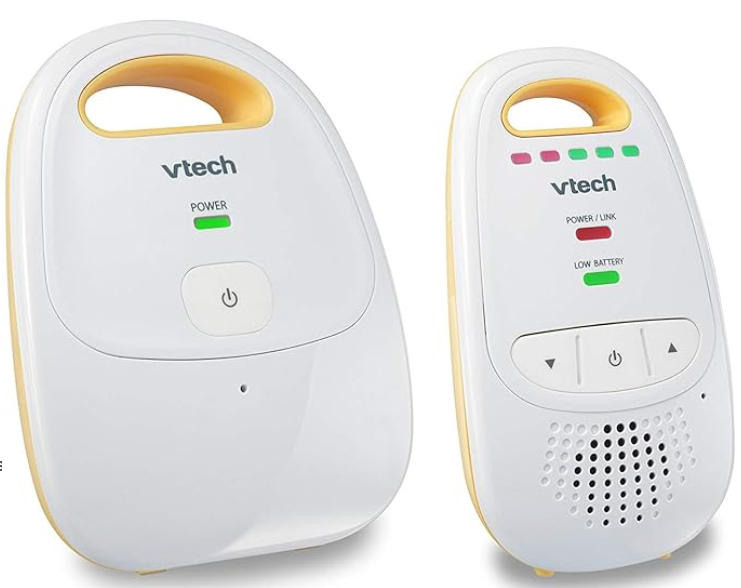
Let me walk you through the actual decisions, in the order they actually matter.
Decision one: WiFi or no WiFi
This is the question the whole market is currently fighting about, and unlike most tech debates, it has a real answer that most review sites refuse to give you because they’re trying not to offend any brands.
Non-WiFi monitors — the Infant Optics DXR-8 Pro ($180), the Momcozy BM04 ($180), the HelloBaby HB6550 ($67) — use a dedicated radio frequency between the camera and a handheld parent unit. The signal stays inside your house. It never touches the internet. No cloud server in a data center somewhere is storing footage of your baby’s bedroom. You lose power to the router? The monitor keeps working. You want to check in from your office three miles away? You can’t. That’s the trade.
WiFi monitors — Nanit Pro ($230-ish), Cubo Ai ($220), Lollipop ($130) — stream through your home network to an app on your phone. This means you can check the nursery from literally anywhere with a cell signal, you can share the view with grandparents, and you get genuinely impressive smart features like sleep analytics and cry detection. It also means the camera is a networked device sitting in your home, and there have been real, documented cases of poorly secured WiFi baby monitors being accessed by strangers. Not theoretical cases. Actual cases where parents heard a voice coming from the baby monitor that wasn’t theirs.
The WiFi brands have improved their security significantly. Nanit and Cubo Ai use end-to-end encryption. But “they’ve improved security” is still a different statement from “this device never connects to the internet.”
My honest opinion: for a first-time parent buying one monitor for one room, non-WiFi is the right call for most people. You don’t need to check your baby from your office. If you’re at work, someone else is watching the baby. The non-WiFi monitor is what you use when you’re in the house — cooking, showering, trying to sleep while the baby sleeps — and that covers 95% of the actual use case.
If you genuinely need remote access — if you’re going back to work and leaving the baby with a nanny and want to check in — then WiFi makes sense and Nanit is the best of that category. Just go in knowing it’s a subscription product. Nanit’s sleep insights, the ones they feature in every ad, require $5 to $10 a month on top of the camera purchase. Over two years that’s another $120 to $240 on top of the hardware. This is not disclosed prominently. Now you know.
Decision two: do you actually need video
Yes. You do.
I know audio-only monitors are cheaper and some older parents swear by them. But when your baby makes a strange noise at 2am, you will spend fifteen minutes lying in the dark trying to interpret whether that sound means “I’m fine, I’m just fussing a little” or “I am in genuine distress.” With video you glance at the screen, see the baby is face-up, eyes closed, just thrashing a little, and you go back to sleep. Without video you either get up to check — which wakes you fully — or you lie there doing sound-based forensics until the noise stops.
Get video. Minimum 720p for night vision clarity, though 1080p is better. The single most important thing about the camera is how it looks in complete darkness, because that’s when you’ll use it most. Cheap cameras in night vision mode produce footage that looks like it was filmed through a window covered in Vaseline. The image is grainy, the outlines are blurry, and you genuinely cannot tell what position the baby is in. The Infant Optics DXR-8 Pro does night vision noticeably better than monitors at its price point. The Nanit Pro does 1080p night vision that’s genuinely impressive — you can see the baby’s face clearly enough to read their expression.
The wearable sensor situation
The Owlet Dream Sock ($299 for the sock, more if you bundle with their camera) wraps around your baby’s foot and measures oxygen saturation and heart rate using pulse oximetry — the same technology as the clip they put on your finger in a hospital. It glows green when readings are normal. If oxygen drops below 80% or heart rate goes outside a preset range, it alarms.
It got FDA clearance in 2024 as a Class II medical device, which is meaningful. And it has genuinely caught real problems in real babies — I’ve read enough of those accounts to take them seriously.
Here is also what it does: it alarms when the sock slips loose. When the baby’s foot gets cold and reduces blood flow to the sensor. When the baby is actively dreaming and breathing irregularly in the way all people breathe irregularly during REM sleep. When, per one review I read from a parent who was clearly running on fumes and needed to vent to the internet, the baby held its breath while passing gas. The false alarms happen at 3am. They’re loud. You bolt upright convinced something is terribly wrong, you run to the nursery, the baby is fine and slightly annoyed at being disturbed. Then you lie awake for an hour because your adrenaline has other plans.
The Owlet team says they’ve improved the false alarm rate, and newer firmware is better. But “improved” still means false alarms exist. Whether the true alerts justify the false alarm burden is a question only you can answer, because it depends entirely on your anxiety baseline. Some parents find the green glow genuinely calming. Others develop a different kind of anxiety — constantly checking the app, waking up when the reading flickers — that’s arguably worse than what they started with.
The American Academy of Pediatrics does not recommend pulse oximetry monitors for healthy full-term babies. They do not say they’re harmful. They say there’s insufficient evidence that they reduce SIDS risk in healthy infants, and they note that the false alarms can cause distress. That’s a nuanced position that the Owlet marketing department has understandably not chosen to feature prominently.
If your baby was premature, has any diagnosed respiratory or cardiac condition, or your pediatrician specifically recommends monitoring: the Owlet is worth serious consideration. If your baby is healthy and full-term: I’d think carefully before handing $300 to a device that might train you to panic at every blip.
Battery life and the thing nobody mentions
Most monitors are sold on specs that describe the camera. Nobody talks enough about the parent unit battery, which is the thing you’re actually carrying around.
Budget monitors typically last 6 to 8 hours on battery. This sounds fine until you realize you’re going to use this thing every nap, every night, for two years. The Momcozy BM04 gets 22 hours in audio-only mode. The HelloBaby HB6550 gets 30 hours. The Infant Optics DXR-8 Pro gets around 10 hours with the screen on, more with the screen set to power-save mode.
Most parents end up keeping the parent unit plugged in overnight and using the battery during the day, so the actual hours matter more for nap portability than nighttime use. But if your house is spread across multiple floors and outlets are inconvenient, longer battery means you’re not hunting for a charger in the middle of a nap window.
Range is the other thing. Every manufacturer lists range in “open field” conditions, which means they took it outside with no walls, no appliances, no microwaves running, and measured the maximum possible signal. The Infant Optics claims 1,000 feet open field. In a real house with concrete floors and a refrigerator between you and the nursery, plan for maybe 200 to 300 feet of reliable signal. That’s usually enough for a normal house. If you have a particularly large home or thick walls, read specifically for real-world range in reviews — not the spec sheet number.
What I’d actually buy
For most first-time parents: Infant Optics DXR-8 Pro, $180. No WiFi, no subscription, good night vision, active noise reduction that blocks out the white noise machine so you can hear the baby instead of the ambient roar of the sound soother. Interchangeable lenses, though you’ll probably never swap them. Solid range. The parent unit is a little plasticky but it works, and “works” is what you need at 4am when you’ve been up three times already.
If remote access genuinely matters and you’re okay with the subscription: Nanit Pro, ~$230 plus $5-10/month. Best WiFi option, best night vision in the category, sleep analytics that are actually useful for tracking patterns over time. Just go in knowing the full cost.
If budget is the constraint: HelloBaby HB6550, $67-99. It does not have the best night vision. It does not have noise reduction. It has a 30-hour battery, a 3.2-inch screen, and it shows you your baby in the dark well enough to confirm they’re fine and go back to sleep. That’s the job. For under $100, it does the job.
The Owlet: only if you have a specific reason, not because the ads made you scared enough to want it.
The monitors that eat into parental sanity fastest are the ones that generate more data than the parents know what to do with — sleep scores, oxygen graphs, nightly reports that invite you to compare Tuesday’s deep sleep percentage against Thursday’s. You are already not sleeping. You do not need a product that gives you homework about not sleeping.
The monitor that has held up best in my observation, used by actual exhausted humans in actual nurseries: the one with a charged battery, a clear night vision image, and no notification telling you your baby’s sleep was “poor” at 3:47am when you were also awake and already knew that.
Maya has spent a lot of time in nurseries belonging to other people’s children. She does not have children of her own, which means she has opinions about baby monitors without the sleep debt, which is arguably the ideal conditions for forming opinions about baby monitors. Prices are U.S. retail, May 2026.