
I want to describe a specific kind of meeting moment that became the reason I still use my Stream Deck two years later.
It’s a Tuesday morning. I’m three minutes into a Zoom call and someone’s dog starts barking in the background of their feed, which sets off my cat, which means I need to mute myself immediately while also trying to look like I’m still engaged in what the speaker is saying, while also not knocking over my coffee reaching for the keyboard shortcut I can never remember because it’s different in Zoom than in Teams. Instead, I reach six inches to the left and press a button with a microphone icon on it. Done. One tap. No fumbling, no wrong shortcut, no awkward delay while I un-mute and say “sorry, my cat.”
The Stream Deck did not transform my creative workflow. I do not stream. I have never used OBS in my life. What it did was remove approximately forty small irritations from my daily work, which turns out to be the same thing as transforming my creative workflow, just described less dramatically.
What the Stream Deck MK.2 actually is
The Stream Deck MK.2 is a USB device with 15 buttons in a 5×3 grid. Each button has a small LCD screen behind it — 128×128 pixels, full color — so you can put an icon, a label, or both on each key. You connect it to your computer, open the Elgato software, and drag actions onto keys. Press a key, the action fires. That’s it.
The actions available are the interesting part. The Elgato plugin store has over 1,200 official integrations covering pretty much every piece of software people actually use: OBS, Zoom, Microsoft Teams, Slack, Spotify, Philips Hue, Apple Music, Adobe Premiere, Lightroom, Final Cut, Figma, Chrome, Safari, VS Code, and on and on. Each plugin exposes the actions that software can do — in Zoom, that’s mute/unmute, start/stop video, share screen, leave call. You put those on buttons. The buttons do those things.
The software also lets you create multi-actions — one button press triggers a sequence of events. My morning routine button opens my email, starts my Spotify playlist, turns on my desk lamp via the Hue integration, and opens my task manager. One button. Four things. I set this up in about eight minutes and I use it every morning without thinking about it. Buy Elgato Stream Deck MK.2 https://amzn.to/4dBn6rA
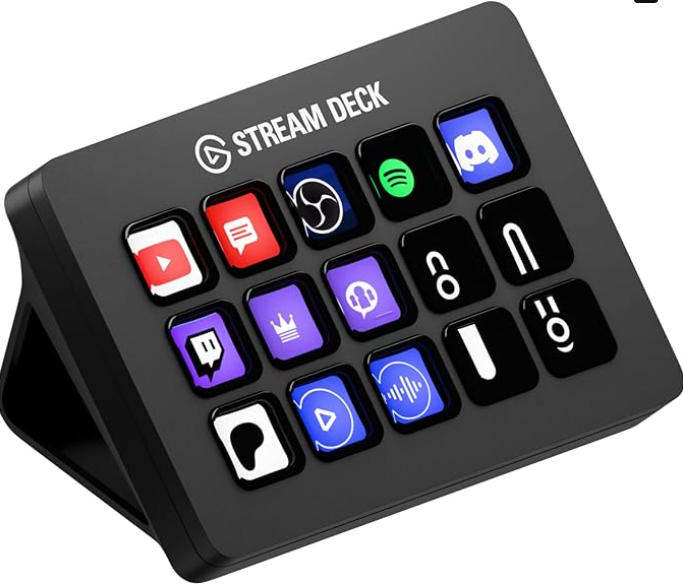
Profiles auto-switch based on what application is in focus. When I’m in Premiere, my Stream Deck shows video editing shortcuts. When I switch to Chrome, it shows my browser shortcuts. When I open Zoom, it shows meeting controls. This happens automatically. I never touch a setting to make it happen.
The setup reality
The first setup takes longer than the box implies. The hardware itself is trivial — plug in the USB cable, open the software, done. What takes time is deciding what to put on the buttons, because that requires knowing what you do repeatedly on your computer and being conscious enough about your own workflow to articulate it.
Most people’s first instinct is to replicate every keyboard shortcut they already use, which works but misses the bigger opportunity. The Stream Deck is best for actions that either don’t have keyboard shortcuts, require multiple steps to execute, or benefit from a physical, always-visible button rather than a key combo you have to remember.
My first week, I put ten keyboard shortcuts on it and found it mildly useful. My second week, I started replacing shortcuts with multi-actions and adding integrations for apps I’d never mapped before. By the end of the second week, I had a genuinely different device — not a keyboard shortcut replacement, but a workflow orchestration panel.
The software is free, runs in the background using about 300MB of RAM, and updates automatically. Mac users will find that some plugin integrations work better on Windows, particularly around system-level controls like volume. Not a dealbreaker, but worth knowing.
What I actually have on mine, in case you need a starting point
Mute/unmute Zoom (the one that started this whole story).
Spotify controls: play/pause, skip, volume up/down. This sounds trivial until you stop reaching for your headphone cable or hunting down the Spotify window that’s buried under six other tabs.
A “focus mode” button that enables Do Not Disturb on macOS, closes Slack, mutes all notifications, and opens my notes app. One press. I use it about four times a day.
Individual keys for my most-opened applications — not because launching apps is difficult, but because having them visible in front of me means I don’t forget they exist. My time tracking app, which I was chronically bad at remembering to log, has been running at nearly 100% usage since I put it on the Stream Deck with a visual timer that shows elapsed time on the key itself.
A key that copies a templated response I use constantly in emails — a scheduling link, formatted properly, one tap. Previously I kept this in a Notes file and copy-pasted it manually approximately eight times a day.
The point of this list isn’t to suggest you should do exactly these things. It’s to illustrate that the most valuable Stream Deck buttons are often mundane: meeting controls, app launchers, and text snippets. Not cinematic scene transitions. Just the small things you do constantly that take slightly longer than they should.
The Elgato lineup: which one to buy
| Stream Deck Mini | Stream Deck MK.2 | Stream Deck + | Stream Deck XL | |
|---|---|---|---|---|
| Approx. price | ~$70–80 | ~$120–150 | ~$180–200 | ~$230–250 |
| Key count | 6 keys | 15 keys | 8 keys + 4 dials | 32 keys |
| LCD resolution | 64×64 per key | 128×128 per key | 120×120 per key | 128×128 per key |
| Rotary dials | No | No | Yes | No |
| Profile key | No | Yes | Yes | Yes |
| Best for | Travel, tight budgets, trying it out | Most people, first Stream Deck | Audio mixing, podcasters | Full-time streamers, complex workflows |
| USB connection | USB-A | USB-C (cable included) | USB-C | USB-C |
The Mini at around $70-80 is tempting as a low-risk entry point, and it works, but there are two genuine downgrades you should know about. First, the LCD resolution is 64×64 pixels per key instead of 128×128 — icons look noticeably softer and small text becomes illegible. Second, no hardware profile key, which means switching between your Zoom profile and your Premiere profile requires navigating menus rather than pressing a dedicated button. For six keys you’re paying about the same per-key price as the MK.2 and getting a meaningfully worse experience. If budget forces the Mini, it’s still worth it. If you can stretch to the MK.2, stretch.
The Stream Deck + at around $180-200 adds four physical rotary dials alongside eight LCD keys. If you do audio work — mixing podcasts, adjusting levels in real time, controlling a DAW — the dials are genuinely excellent for that use case. Turning a real knob to adjust volume is more satisfying and more precise than pressing up/down buttons. If you’re not doing audio work, the dials’ advantage is less obvious and the lower key count is a real trade-off. Most first-time buyers should skip the + and start with the MK.2.
The XL at around $230-250 has 32 keys. The people who need 32 keys know they need 32 keys. If you’re asking whether you need it, you don’t.
Budget alternatives have improved significantly in 2025-2026. The FIFINE D6 at around $65 and several AJAZZ models offer 15-key LCD controllers at roughly half the MK.2’s price, with decent software and reasonable build quality. They’re not as polished as Elgato — software depth is shallower, plugin ecosystem is smaller, build quality is noticeably lighter — but they work and they’re a legitimate option if you want to try the format without committing full price. If you try a budget clone for a month and decide you use it daily, upgrade to the MK.2. If you use it once and forget about it, you’re out $65 instead of $130.
The honest case for not buying it
The Stream Deck has no value for someone who doesn’t have a computer-centric workflow. If you use your computer primarily for browsing and email, an occasional Zoom call, and not much else, the learning curve of setting up a Stream Deck is longer than the time it would save. The ceiling of value scales directly with how much time you spend in front of a computer and how much of that time involves software you interact with repeatedly.
There’s also a setup cost that doesn’t go away. When you get a new computer, you export your Stream Deck profile and import it on the new machine, which takes about ten minutes and mostly works. When an app updates and breaks a plugin, you troubleshoot it. When you change your workflow substantially, you reconfigure buttons. This is not onerous — I spend maybe thirty minutes per year on Stream Deck maintenance — but it’s not zero, and people who hate configuring things should know it exists.
The RAM usage of 300MB running in the background is a real consideration if you have an older machine with limited memory. It’s not significant on anything made in the last four years, but worth checking.
The thing nobody says in these reviews
Most Stream Deck reviews are written by people who already knew they needed one. The review confirms what they already believed. What’s harder to find is an account from someone who was genuinely uncertain, bought it skeptically, and then updated their view based on actual use.
I was genuinely uncertain. I don’t stream. I thought of it as a streamer’s toy. I bought one on sale because I was curious and the return window gave me an exit if I was wrong.
I was wrong about who it’s for. The people who benefit most from a Stream Deck are not necessarily people with complex streaming setups — they’re people who do the same computer tasks repeatedly and have never bothered to optimize them because individually, each task is fast enough that optimization seems silly. Collectively, the small frictions add up to a workday that’s slightly more effortful than it needs to be, and the Stream Deck addresses that at the source.
The mute button was the gateway. The morning routine multi-action was where I became a convert. The time tracker integration with the visual timer is what made me keep it permanently.
Your version of those three things might be completely different from mine. But if you work at a computer for more than five hours a day, your version exists. Setting it up takes an afternoon. Using it becomes invisible — which is the same thing as using it perfectly.