
There’s a specific week in everyone’s robot vacuum ownership journey that I think of as the Honeymoon Week.
You’ve unboxed it. You’ve watched it map your apartment with the earnest, methodical energy of a new intern on their first day. You’ve sat on your couch and just… watched it clean. This is a thing humans do. We pay several hundred dollars for a machine to do a task we find tedious, and then we immediately spend twenty minutes watching it perform that task instead of doing literally anything else. The robot vacuums while you observe it vacuuming, and somehow this feels like a productive use of everyone’s afternoon.
The Honeymoon Week is real and it is delightful. The robot finds a surprising quantity of dust you didn’t know was there, comes back to its dock, and the app sends you a little map of where it went with a cheerful notification. You feel like you are living in the future. You text someone about it.
Then the Honeymoon Week ends, and you enter what I consider the actually important phase: the long middle stretch where you either forget the robot exists because it’s quietly doing its job, or you develop a complicated adversarial relationship with a machine that weighs ten pounds and occasionally gets stuck under the couch.
I’ve owned four robot vacuums over six years. I currently use the Eufy X10 Pro Omni. The following is what I know, organized not by spec sheet but by the sequence of things you’ll actually care about.
First, the honest pitch for the product category
Robot vacuums are a solution to a specific problem: not that your floors get dirty, but that cleaning them requires you to be present, active, and not doing anything else for twenty minutes. The value proposition is not that robot vacuums clean better than you do — they don’t, in the same way a dishwasher doesn’t clean dishes as thoroughly as you could if you were really committed — it’s that they clean adequately and do so while you’re at work, asleep, or sitting twelve feet away watching a television show without thinking about your floors.
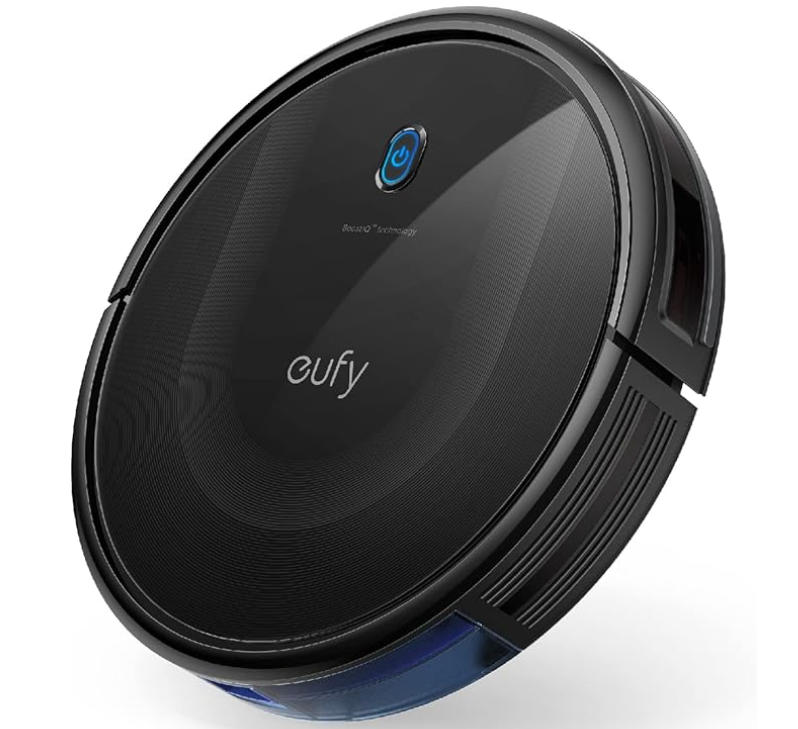
Buy Eufy Robot Vacuum From Amazon https://amzn.to/4a5TQIr
This sounds modest, and it is. But modest done consistently has compounding benefits. Floors that get vacuumed every two days on a schedule don’t build up the kind of debris that requires serious cleaning effort. Robot vacuums are preventative maintenance, not deep cleaning. If you buy one expecting it to replace the twice-yearly carpet scrubbing or the quarterly under-sofa excavation, you’ll be disappointed. If you buy one expecting your floors to be in a state of ongoing adequacy so that the occasional manual clean requires half the effort, you’ll be satisfied.
This distinction matters when you’re picking a model. The person who needs a preventative maintenance tool and the person who needs a deep-cleaning replacement have genuinely different requirements, and the robot vacuum industry has historically blurred the line between them.
The Eufy lineup in 2026, and how to navigate it without a guide
Eufy makes too many robot vacuums. This is not unusual for the category — Roborock and Ecovacs are equally guilty — but it creates a specific confusion where someone trying to buy their first robot ends up spending forty-five minutes on a comparison page for products with names like “L60 Hybrid” and “Omni C20” and “E28 Deep Clean” without any clear sense of what any of those words mean in practice.
Here’s the actual hierarchy, without the naming confusion.
The budget tier — anything under $300 — gets you a robot that vacuums, navigates somewhat intelligently, and goes back to its dock when done. It needs its dustbin emptied manually after every few runs. No mopping, no auto-emptying, no self-cleaning anything. The Eufy RoboVac 11S is the classic example: flat, quiet, good on hard floors, approximately the intelligence level of a Roomba from 2018. Fine for a small apartment with no pets and a high tolerance for emptying dustbins.
The mid tier — $300 to $600 — adds LiDAR navigation (significantly better mapping and room-level control), stronger suction, and sometimes basic mopping. The L60 Hybrid is here. These are the models most people describing themselves as “not a heavy user” should seriously consider. They map well, clean well, and the price isn’t making a claim that the performance has to justify.
The upper tier — $600 to $900 — is where the X10 Pro Omni lives, and it’s where the product category takes a significant step toward the “forget it exists” goal. The X10 Pro Omni vacuums, mops with spinning pads, empties its own dustbin into the dock, washes its own mop pads, dries the mop pads with heated air, and refills its own clean water tank from the dock’s reservoir. The dock does the dirty work so completely that your interaction with the cleaning system collapses to: swap the dust bag every couple of months, refill the water reservoir every week or two, occasionally clean the filter.
The X10 Pro Omni launched in early 2024 at $799. By late 2025 it regularly goes on sale for $530-600. At that price it represents genuinely unusual value — comparable machines from Roborock and Ecovacs run $800-1,100 with similar feature sets.
The S1 Pro Omni is the current flagship at $800-1,000 and adds a 10-in-1 dock, better obstacle avoidance with 3D MatrixEye depth vision, and heated water mopping. It’s meaningfully better for hard floors and mopping in complex spaces. If you have dogs, lots of tile, and the budget: S1 Pro. If you have a mix of hard floor and carpet and want the best value for the feature set: X10 Pro Omni.
The things you have to prepare your home for
I’m going to say something that feels slightly counterintuitive: owning a robot vacuum requires more thought about your floor before you buy it than you’ve probably given your floor in years.
The X10 Pro Omni is 4.47 inches tall. Any furniture with less than 4.5 to 5 inches of clearance between the legs and the floor will be off-limits. I measured the clearance under my IKEA sofa when I first got the robot and discovered it was 4.2 inches. The robot detected the sofa immediately and mapped it as a no-go zone, which is correct behavior, but it also meant the zone under the sofa — historically a significant collection point for dust, hair, and whatever falls out of pockets — never gets cleaned automatically. I bought sofa risers for $18. This is the kind of ancillary purchase robot vacuum ownership generates.
Cables on the floor are the enemy. A charging cable running from a wall outlet to a phone on a desk is, to a robot vacuum, a fascinating object to investigate and potentially get entangled with. The X10 Pro Omni has AI.See camera-based obstacle avoidance and it does avoid cables most of the time, but “most of the time” is doing meaningful work in that sentence. My phone charger has been consumed twice in eight months. The solution — cable management clips to route cables up furniture legs or along baseboards — costs about $12 and probably should have happened years before I owned a robot vacuum.
Rugs with fringe are an existential threat. The robot will find the fringe, attempt to eat it, partially succeed, stop moving, and announce to the app that it requires your attention. I have a jute rug with small tassels along the edge. The X10 Pro Omni has a complicated relationship with this rug. I’ve set a no-go zone around the fringe edge specifically, which helps, but the rug itself taught me that fringed edges and robot vacuums have been adversaries since the beginning and this is unlikely to change.
Small things left on the floor — socks, hair ties, pen caps, the small plastic bits that fall off everything — will either be vacuumed up or cause the robot to halt, depending on their size and position. I do a thirty-second “floor check” before running the vacuum, which takes less time than the manual vacuuming it’s replaced. This is not a burden. It is a slightly annoying acknowledgment that the robot cannot do quite everything.
Dark rugs confuse cliff sensors. This one surprised me. A black or very dark rug can register on some robot vacuums’ sensors as a drop — the same signal as a staircase edge — causing the robot to avoid it entirely or approach with excessive caution. My charcoal-colored bathroom mat triggered this on my previous robot. The X10 Pro Omni handles it better with AI.See camera detection instead of pure IR cliff sensing, but if you have very dark area rugs, it’s worth knowing that some models will avoid them.
How the mopping actually works, and when it’s worth caring about
The X10 Pro Omni’s mopping system uses two spinning circular pads that rotate against the floor surface under the weight of the robot. It’s not like someone manually mopping — it’s more like a light scrub applied consistently across the floor surface with downward pressure around 1.8 pounds per pad. The pads lift up 12 millimeters when the robot detects carpet, so the wet mops don’t drag across your rugs.
This is useful for hard floors that accumulate a thin film of grime over time — the kitchen, the bathroom tile, the hallway. It’s not useful for dried spills, tracked-in mud, or anything that requires actual scrubbing effort. I have come to think of the mopping as maintenance-grade: it keeps floors looking clean on an ongoing basis, so that when you do mop manually (which still has to happen occasionally, let’s be honest) the job requires much less effort because you’re not starting from a worse state.
The dock’s auto-wash cycle runs hot water through the mop pads after each cleaning session. The heated air drying prevents mildew. You do need to change the clean water in the dock’s reservoir and empty the dirty water container regularly — every few days if you’re running the mop frequently, weekly if you’re in maintenance mode. This is genuinely less maintenance than I expected when I bought it. It takes about two minutes.
One thing that nobody really emphasizes: the mop pads wear out. Replacement pads cost around $15-20 for a pack of several, and you’ll replace them every few months depending on use. This is a running cost that most reviews don’t mention prominently. It’s not expensive, but it’s not zero.
The app, and what you’ll actually use it for
The Eufy app is required for setup and useful for ongoing management, but it’s not something you’ll open every day once the robot is running well. The initial mapping run takes 20-40 minutes depending on apartment size, during which you should not interfere — let it complete the full map. After that, you can divide the map into rooms, set cleaning schedules, define no-go zones (the fringe rug, the cable area, the dog’s water bowl vicinity), and control which rooms get cleaned in which order.
I run the robot on a schedule: every morning at 8am, starting with the kitchen, then the living room, then the hallway. By the time I’m ready to work at 9am, it’s docked and done. This happens automatically. I open the app maybe twice a week, usually to check whether anything went wrong or to adjust a zone.
The real-time map it shows during cleaning is satisfying to watch in a way I cannot entirely justify. The robot traces its path on the map and you can watch it systematically cover the floor. This is the closest thing to ASMR that a cleaning appliance has ever produced, in my experience.
Alexa and Google Assistant integration works: “Alexa, tell Eufy to start cleaning the kitchen” is a thing you can say and have work. This felt impressive the first week and now feels normal, which is the correct trajectory.
The numbers, because they matter
8,000 Pa suction — this is toward the top of the current robot vacuum market and is genuinely meaningful on carpet. The X10 Pro Omni can pull embedded pet hair from medium-pile carpet in a way that budget models can’t. Real-world testing puts its carpet cleaning in the top tier for the price bracket.
60 LEDs per meter for the navigation light — no, wait, that’s the Govee article. Let me correct course.
The X10 Pro Omni’s dustbin holds 400ml, which is enough for one to two full cleaning sessions for a typical apartment before the auto-empty cycle is needed. The dock’s dust bag holds approximately 45 days of debris, depending on floor area and pet situation. If you have two dogs and 1,500 square feet of floor, expect to change the bag monthly. If you have no pets and a two-bedroom apartment, it’ll last longer.
Runtime is around 180 minutes on a full charge, which covers most home floor plans comfortably. It returns to dock automatically when battery runs low and resumes where it left off after recharging — a feature that sounds standard but wasn’t on earlier generations and is legitimately useful in larger spaces.
The dock is large. 16 inches wide and 18 inches tall. It needs a wall outlet nearby and clearance in front of it for the robot to approach from any angle. It is not something you hide in a closet between uses. Plan for it as a permanent floor fixture that you’ll need to design around slightly.
What I’d tell you to buy
First robot vacuum, apartment under 900 square feet, hard floors primarily, no pets: Eufy L60 Hybrid, around $300-350. LiDAR navigation, basic mopping, good mapping, no auto-empty. Do the maintenance yourself, it’s infrequent.
First robot vacuum, house or larger apartment, mixed flooring, one or two pets: Eufy X10 Pro Omni, when on sale around $530-600. The auto-empty and auto-wash genuinely change the ownership experience from “appliance I maintain” to “system I occasionally check on.”
Already have a robot vacuum but it’s over four years old and you’re frustrated by its navigation: any current LiDAR model is a significant upgrade over older gyroscope-navigation models. The map quality and room-level control aren’t incremental improvements — they’re fundamentally different capabilities.
Have a very specific situation — lots of tile, dogs, really care about mopping quality: the S1 Pro Omni is worth the extra spend. The 3D MatrixEye obstacle detection alone is a meaningful improvement if you have dogs who leave things on the floor.
Not ready to spend $500 on a robot vacuum: completely reasonable. The budget tier still does most of what matters.
Six years into robot vacuum ownership, the thing I notice most is what I no longer notice. I don’t think about vacuuming. I don’t see the floors and calculate how long it’s been since they were last cleaned, the way I used to. They’re just clean, continuously and quietly, by something that goes back to its dock and waits for tomorrow.
The Honeymoon Week was great. But the part where it became invisible — that’s where the product actually delivered on its promise.