
I’ve owned four iPads. I currently use one every day. And I still cannot give you a clean, convincing answer to the question “but what do you actually use it for?”
This is not a personal failing. It is the defining characteristic of the iPad as a product category. The iPad exists in a space that no other consumer device occupies — bigger than a phone, less capable than a laptop, more versatile than either, and somehow justified by neither. It is a device that people buy because it’s obviously useful and then spend six months figuring out specifically how. The ones who figure it out become people who cannot imagine life without one. The ones who don’t end up with a very expensive coaster on their coffee table.
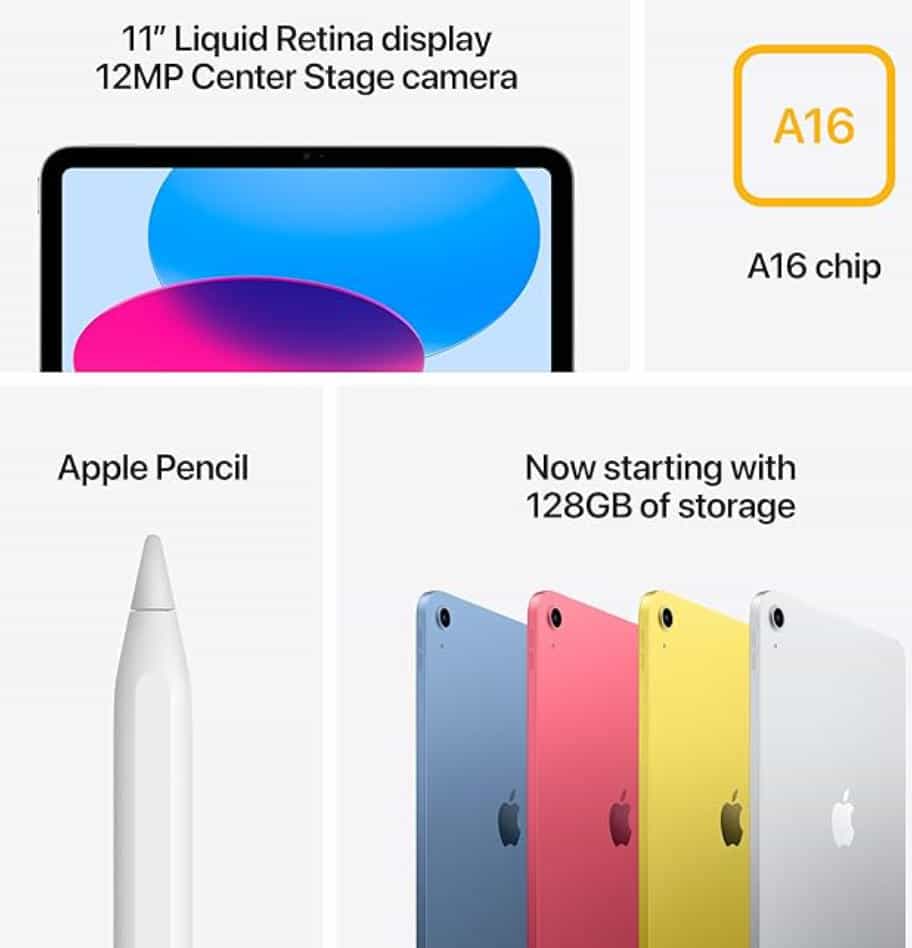
The 2025 iPad — 11th generation, A16 chip, $349 — is the best version of this particular device dilemma that Apple has ever made. Which is either a compelling purchase argument or a very expensive philosophy question, depending on who you are.
Let me help you figure out which.
What Apple actually changed this time
The honest answer: not much visible, and one significant invisible thing.
The design is identical to the 10th generation from 2022. Same aluminum flat-edge frame, same USB-C port, same 11-inch screen with the same 264 PPI resolution and same 60Hz refresh rate, same 12MP cameras front and back, same four color options (though this year’s shades are slightly different and I couldn’t tell you which direction they moved without looking it up). If you put a 10th gen and 11th gen side by side, you would not be able to tell them apart without turning them on.
What changed under the hood: the A14 chip became an A16 chip, and RAM went from 4GB to 6GB. The A16 is the same processor that powered the iPhone 14 Pro in 2022 — three-year-old phone silicon transplanted into a new iPad body. Apple bumped base storage from 64GB to 128GB at the same $349 price, which is the part that matters most for actual buyers. 128GB is a real amount of storage. 64GB was an amount of storage that made you feel guilty for taking photos.
In benchmark testing the A16 scores around 2,464 single-core and 5,837 multi-core on Geekbench 6. For everyday tasks — browsing, video, documents, apps, casual gaming — it is more than fast enough. Considerably more than fast enough. The chip is not the bottleneck for anything a normal person does on an iPad.
The performance ceiling question only matters when you bump into it, and most people never will.
The screen situation, which requires honesty
The 11-inch Liquid Retina display is sharp, accurate, and adequate. It is also, by the standards of 2025 tablet competition, the weakest part of the device — and I want to be direct about this because most reviews either bury it or phrase it so diplomatically it loses its meaning.
The display is not laminated. This means there’s a visible air gap between the glass you touch and the pixels beneath it. Hold an 11th gen iPad next to an iPad Air and the difference is immediately apparent: the Air’s pixels appear to sit right at the surface of the glass, as if the display is painted on. The standard iPad’s pixels look like they’re sitting a few millimeters behind the glass, because they are. This matters more than you’d expect for writing and drawing — the slight sense of disconnect between where your finger or Pencil touches and where the ink appears is real and takes adjustment. For watching video and browsing, most people stop noticing it after a week.
The 60Hz refresh rate means scrolling looks ever so slightly choppier than on a ProMotion display. Again: most people won’t care or notice, especially coming from a phone that’s also 60Hz. The 500 nit maximum brightness is fine indoors and borderline inadequate in direct sunlight. I’ve found myself tilting the screen to avoid glare more often than I’d like.
None of this makes the screen bad. It makes it appropriate for $349. The moment you start comparing it to what $599 gets you in an iPad Air, you start understanding what the extra $250 is actually buying.
The Apple Intelligence absence, and whether you should care
The 11th gen iPad does not support Apple Intelligence — Apple’s on-device AI system that handles writing tools, image generation, priority notifications, and Siri improvements. This is because Apple Intelligence requires 8GB RAM and an A17 Pro chip or newer M-series chip. The iPad 11 has 6GB RAM and an A16. Not close enough.
Whether this matters depends entirely on how much you actually use Apple Intelligence on devices that have it.
My honest assessment after a year of using Apple Intelligence on my iPhone 15 Pro: I use the Writing Tools occasionally, Genmoji almost never, the improved Siri somewhat, and image cleanup more than I expected. None of it has become essential. I would miss it if it disappeared but I wouldn’t mourn it. For a tablet that I use primarily for reading, video, light documents, and sketching, Apple Intelligence’s absence registers as a mild inconvenience, not a deal-breaker.
If you are specifically buying an iPad to use as an AI-powered writing and productivity tool — and this is a legitimate use case — the iPad Air at $599 is the minimum you should spend. It has the M3 chip, 8GB RAM, and full Apple Intelligence support. The laminated display is also noticeably better for document work.
For everyone else: the AI features are not worth $250 today. They might be worth it in two years as Apple Intelligence matures. By then you’ll probably want a new device anyway.
What this iPad is actually for, specifically
After four generations and counting, here is my clear-eyed list of what the standard iPad is genuinely excellent at, based on daily use rather than spec-sheet optimism.
Watching things. The 11-inch screen is a dramatically better video experience than any phone. Lying in bed watching something on an iPad Pro is nice. Lying in bed watching something on a standard iPad is also nice. The difference is real but not profound.
Reading and light browsing. A good case that props the iPad up, a comfortable chair, and a long article or e-book is a genuinely superior experience to the same content on a phone. The larger text, the better viewing angle, the reduced eye strain — these are real. I read more longform content since I started leaving the iPad in my living room as a dedicated “reading in the evening” device.
Kids. This is the use case where the standard iPad is most obviously and immediately justified. It’s a device that will run every child-appropriate app, survive being dropped by someone too young to appreciate electronics, and cost $349 instead of $799. If you’re buying an iPad primarily for a child’s use, buy the standard iPad without a moment’s hesitation.
Creative hobbies. The iPad 11 supports the Apple Pencil (USB-C) — the second-generation version, not the more expensive Pro. For casual sketching, note-taking, and hobby illustration, this is entirely sufficient. The non-laminated screen does create a slight pen-to-pixel gap that serious illustrators will find annoying; casual ones adjust within a few sessions.
Travel companion. 477 grams. 7mm thin. Fits in a bag in a way a laptop doesn’t. As a dedicated travel device for movies, reading, and light communication when you want something bigger than your phone but lighter than a laptop, it does the job completely.
The moment I’d tell you to spend more
There are two specific purchase decisions where I would actively steer someone away from the standard iPad toward the Air.
First: if you work in or near direct sunlight, or regularly use your tablet outdoors in bright conditions. The 500 nit ceiling is noticeably limiting outside. The iPad Air’s display handles sunlight meaningfully better.
Second: if writing is central to your intended use — journaling, drafting documents, longform notes. The non-laminated display with Apple Pencil has more perceptible lag than a laminated one, and for high-volume writing it’s the kind of friction that accumulates into real frustration. I know someone who bought the standard iPad for her graduate thesis writing, spent two months annoyed by the feel of the Pencil on screen, and upgraded to the Air. She’s happier. She’s also $250 poorer. Spend it the first time.
Everyone else: $349 is the right number.
The version to actually buy
Start at $349 for 128GB WiFi only, no cellular. You almost certainly don’t need cellular — your phone’s hotspot covers 95% of the situations where you’d want a connected iPad away from WiFi, at no additional monthly cost.
Spend the $20 extra within the education store if you’re a student or teacher — it gets you $40-50 off with the education discount.
Do not buy the 64GB version because there is no 64GB version this year, which is Apple finally making a sensible call. 128GB is the base. Start there. Most people won’t need more.
One accessory that’s actually worth it: a case with a built-in stand. The Magic Keyboard Folio is excellent and also costs nearly as much as the iPad itself, which is a sentence that should give you pause. A $35 third-party folio case from Amazon that props the iPad up at a viewing angle is 90% of the utility at 5% of the cost.
The iPad has existed for fifteen years and the core pitch hasn’t changed: it’s a large screen that runs apps, it goes anywhere, and it’s better than a phone for anything that benefits from more space. The 11th generation doesn’t reinvent this. It executes it cleanly, at a price that’s held flat while everything else has gotten more expensive, with enough internal performance to last another four years without breaking a sweat.
I still can’t tell you exactly what you’ll use it for. That part’s on you. But I can tell you that if you figure it out, you’ll be glad you have it.