
Tell me if this sounds familiar.
You decide to read more this year. You open the Kindle app on your phone, get three paragraphs in, and then — without fully deciding to — you’re checking a notification. You go back to the book. Two paragraphs. Then Instagram. You close Instagram and reopen the book and reread the same paragraph you just read because you don’t remember it, and then your screen-time app tells you it’s been forty minutes and you’ve read approximately one page.
This is not a reading problem. This is an ecosystem problem. Your phone is a machine that has been optimized by some of the smartest engineers alive to capture and hold your attention, and it is very good at its job, and asking it to also be your reading device is like asking a casino to host your AA meeting. The environment is working against you.
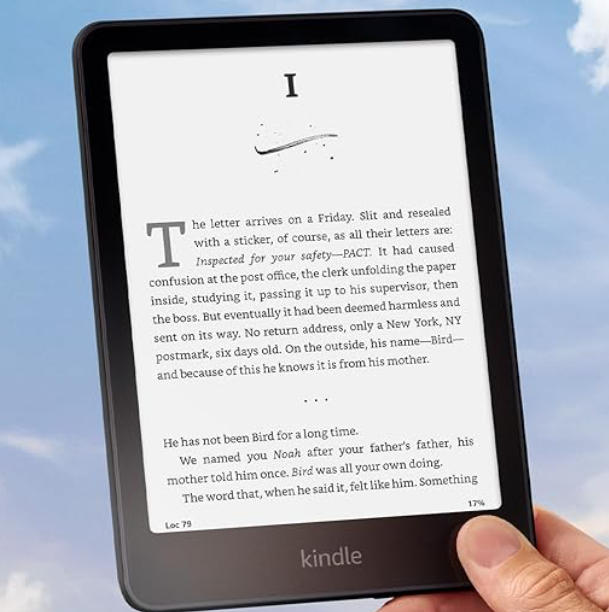
The Kindle Paperwhite exists to solve this exact problem, and it does it in the least technical way imaginable: by being a device that can’t do anything except read books.
What the 12th generation actually is
The 2024 Kindle Paperwhite — Amazon calls it the 12th generation, Kindle enthusiasts call it the PW6, the box just says “Kindle Paperwhite” — came out in October 2024. It is $159.99 with lockscreen ads, $179.99 without them. The Signature Edition is $199.99 and adds wireless charging plus automatic brightness adjustment.
The screen is 7 inches of E Ink Carta 1300, which is the best e-paper panel currently in production. Resolution is 300 PPI — the same as a quality printed book page, and meaningfully sharper than anything you can comfortably read on a phone without zooming. The display refreshes 25% faster than the previous generation, which matters because the main complaint about E Ink has always been the slow “flash” between page turns. At this generation’s speed, it’s not gone, but it’s reduced to the point where it stops being distracting.
Weight is 213 grams, roughly the weight of a paperback, which is either obvious or reassuring depending on how you think about it. IP68 waterproof rating means it can go in the bath, by the pool, on a boat in light rain. I’ve dropped mine in a full bathtub and the only casualty was my dignity. Battery lasts up to 12 weeks according to Amazon, which is a number I will explain why you should mostly ignore in a moment.
Storage is 16GB standard, though 4.5GB of that is taken by the operating system, leaving you 11.5GB for books. An average novel is 1-3MB. You will never run out of space.
The battery number and why it doesn’t mean what you think
Twelve weeks. That number is on every Kindle Paperwhite box and in every headline. It is not wrong, exactly, but it describes a person who reads for thirty minutes a day with the front light off and WiFi disabled — a reading habit so conservative it barely counts as one.
In actual use, with the front light on (which you need unless you only read in direct sunlight), WiFi occasionally enabled, and a realistic reading pace: expect three to four weeks between charges. Still extraordinary. Still so far beyond any tablet or phone that the comparison doesn’t really make sense to draw. But three weeks, not twelve.
Here’s why this doesn’t matter: the Kindle lives in a bag or on a nightstand between reading sessions. You charge it once a month the way you might charge a travel toothbrush — not constantly, not urgently, just occasionally. Charging anxiety, which is a real phenomenon with every other battery-powered device in your life, does not exist with the Kindle. You will never pick it up and see 4% and feel the particular panic that number produces. The battery is a non-issue in practice, which is itself a kind of luxury.
The reason the Paperwhite specifically, and not the cheaper Kindle
Amazon sells four Kindles right now. The basic Kindle is $99. The Paperwhite is $159. The Paperwhite Signature Edition is $199. The Kindle Colorsoft is $279.
The basic Kindle’s screen is 6 inches at 300 PPI. It has no warm light option and the front light is less even. For bedtime reading, the cooler, less uniform lighting is noticeably worse on the eyes over a long session. It also lacks waterproofing, which matters more than you might think — bath reading, beach trips, the general unpredictability of life near liquids.
The Paperwhite adds the warm light (adjustable from cool white to amber, very easy on the eyes at 1am), the waterproofing, a slightly larger 7-inch screen, and meaningfully better build quality. The extra $60 over a year of daily reading is so diffuse as to be irrelevant. Get the Paperwhite.
The Signature Edition’s wireless charging is convenient if you have a Qi pad already on your nightstand. The automatic brightness adjustment is a small comfort. Neither feature is worth $40 unless you specifically want wireless charging, in which case it’s worth it immediately.
The Colorsoft at $279 has a color E Ink display. It is the right device for comic books, graphic novels, and illustrated children’s books. For text-only reading — novels, narrative nonfiction, essays — the regular Paperwhite’s black and white display is actually crisper and more readable, because color E Ink hasn’t yet reached the contrast ratio of its monochrome counterpart. Unless you read a lot of illustrated content: skip it.
One more thing about the $159 model: buy it without ads. The “with ads” version shows sponsored content on your lockscreen. This saves you $20 upfront. It will annoy you every single time you pick up the device for the next three to five years. Twenty dollars divided across five years is four dollars a year to not see ads on your reading device. Pay the four dollars a year.
The thing Amazon doesn’t want me to mention
The Kindle home screen in 2026 is increasingly a storefront with a reading app attached.
Recommendations for Kindle Unlimited. Promoted titles. “Customers also bought.” The interface, which used to put your library front and center, has gradually shifted to put Amazon’s revenue interests front and center. This has been a slow drift over years, noticed mainly by people who’ve owned Kindles since the early generations, and it now sits at a level of commercial friction that is genuinely annoying for a device you bought specifically to escape commercial friction.
You can get to your library from the home screen. It requires a deliberate navigation step that didn’t used to be necessary. This is a small thing that compounds into a slightly sour feeling over time, the way a restaurant slowly making their portions smaller is a small thing that makes you trust them less.
It doesn’t ruin the device. The reading experience, once you’re in a book, is still excellent — the screen, the page turns, the dictionary lookup, the highlights, the adjustable fonts. None of that has changed. But knowing that the home screen is engineered to sell you things is worth knowing before you hand over $180 and expect a pure reading device. It’s mostly pure. Not entirely.
The honest answer to “will I actually use this”
This is the question that matters more than any spec, and I’m going to be more direct about it than most reviews will.
If you currently read at least two or three books a year and you read them on your phone or tablet: you will use the Kindle and you will like it. The E Ink screen is easier on the eyes than LCD or OLED over long sessions in a way that’s hard to fully convey in text and immediately obvious when you’re two hours in and your eyes don’t hurt. The distraction removal is real and significant. The portability — one device with your entire library, thinner than a notebook — is genuinely useful for travel.
If you have not finished a book in more than a year: the Kindle will not fix this. What stops most people from reading isn’t the quality of their reading device — it’s the absence of a reading habit. A Kindle sitting on a nightstand next to a phone is still competing with the phone for your attention, and the phone has Instagram and the news and everything else, and most nights the phone wins. The Kindle solves the distraction problem during reading. It does not solve the problem of starting to read instead of doing something else.
I have a friend who bought a Kindle every year for three consecutive years, each time convinced that this time, with the new model, she would finally read more. She now has three Kindles and has read four books. The fourth one she read on her phone because the Kindle battery was dead. Don’t be her.
Buy the Kindle if reading is already something you do and you want to do it more comfortably. Don’t buy it as a motivational tool. It is a very good reading device. It is not a personality transplant.
The alternatives worth knowing about
Kobo makes excellent E Ink readers — the Kobo Clara BW is around $129, the Kobo Libra Colour is $219 — and they’re meaningfully better on one specific dimension: they don’t push Amazon content at you. The reading experience is comparable, the hardware is comparable, the ecosystem is less locked-in. If the Amazon storefront on your home screen idea bothers you before you’ve even bought the thing, start with a Kobo.
The main argument for Kindle over Kobo is the same as it’s always been: if you already buy books on Amazon, already have a Kindle library, or already use Kindle Unlimited, the ecosystem integration is seamless in a way that Kobo, for all its virtues, doesn’t quite match.
It’s a strange thing to write two thousand words about a device that does one thing. Most product reviews exist to help you understand complexity. The Kindle Paperwhite’s pitch is the opposite of complexity: it’s a screen that shows you text, it’s comfortable to hold, the battery lasts long enough that you forget it needs charging, and it can’t show you anything that will distract you from the words on the page.
That last part is the whole product. Everything else is details.
Maya reads approximately forty books a year, most of them on a Kindle Paperwhite, a few in physical form when she buys something she wants to be able to lend to people and never get back. She pays the extra $20 for no ads. Prices are U.S. retail as of May 2026.