
I want to describe a specific kind of hell.
You are ready to leave. Shoes on, bag packed, three minutes to spare. Your hand reaches for the keys on the hook where the keys always live and the hook is bare. You check your pockets. You check the bag. You check every flat surface in the kitchen, then the living room, then retrace your steps to the bedroom even though you haven’t been to the bedroom since this morning. You lift couch cushions. You open the refrigerator, because keys have been found in refrigerators before and the universe is indifferent to dignity. Eight minutes later you find them in the pocket of yesterday’s jacket, which is where you apparently left them when you were apparently a different, worse version of yourself.
Bluetooth trackers exist specifically for this moment. They exist for the five minutes of ceiling-staring and adrenaline before the refrigerator check. They exist, if I’m being honest, to prevent the specific feeling of wanting to fire yourself from your own life.
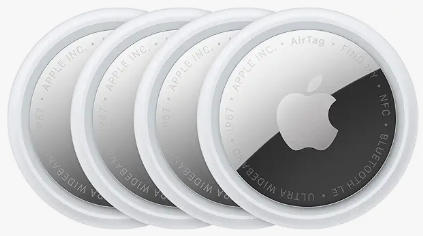
I’ve had an AirTag on my keys for two years. Here’s everything I know about whether it, or one of its competitors, is worth attaching to your worldly possessions. Buy AirTag from Amazon https://amzn.to/4nOzCZE
The one truth that determines your entire purchase
Every review of Bluetooth trackers eventually gets to this conclusion, usually in paragraph eight after exhaustive spec comparison: buy the tracker that matches your phone’s operating system.
AirTag works via Apple’s Find My network — a crowd-sourced detection system that uses every iPhone, iPad, and Mac in the world as an anonymous relay. When your lost AirTag is within Bluetooth range of any Apple device (not just yours), its location is silently reported back to you. Apple has approximately 1.5 billion active devices worldwide. The network is enormous and dense, especially in cities. If you have an iPhone, the AirTag works better than anything else because the underlying network is unmatched.
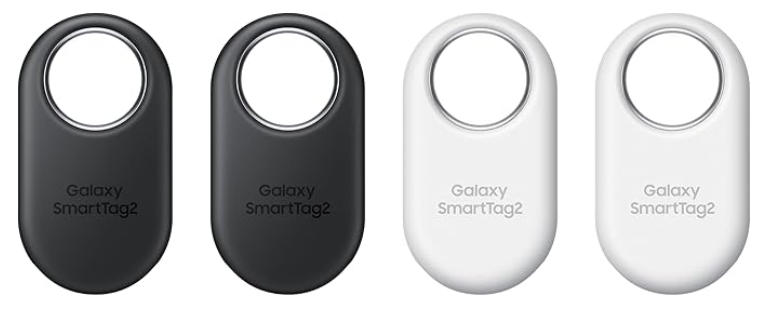
Samsung SmartTag2 uses Samsung’s SmartThings Find network, which now counts around 300 million registered devices. Still substantial, growing fast, and meaningfully better than it was two years ago. If you have a Samsung Galaxy phone, the SmartTag2 is the correct answer for essentially the same reason the AirTag is correct for iPhone users. Buy Samsung SmartTag from Amazon https://amzn.to/4fyQKQK
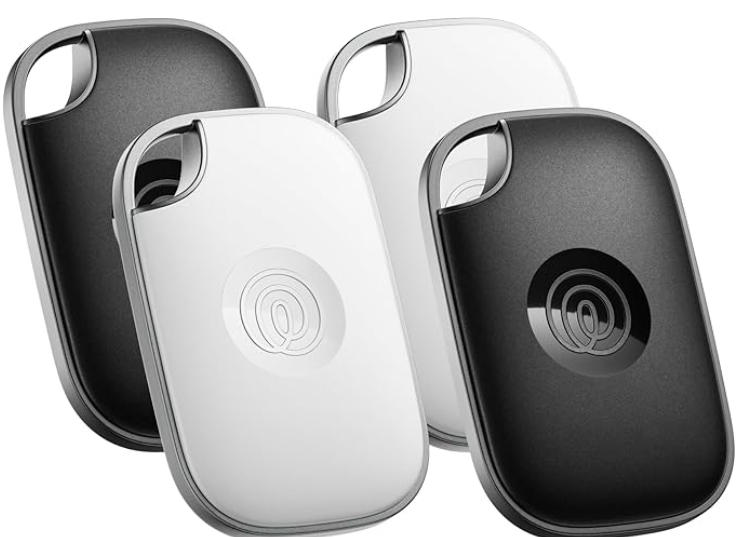
Tile works across both iOS and Android and has its own network of around 40 million devices. It’s the answer when your household is mixed — you have an iPhone, your partner has a Pixel — or when you specifically want platform independence. The trade-off is a thinner network and, increasingly, features hidden behind a subscription.
I use an iPhone. I have an AirTag. I would not have bought anything else, and I would not switch.
What these things actually do, because the marketing gets fuzzy
A Bluetooth tracker is a small coin-sized device with three components: a Bluetooth radio, a speaker, and a battery. It doesn’t have GPS. It cannot pinpoint its location independently. Everything it does depends on proximity to a phone — either your phone or someone else’s phone passing by.
When your tracker is within Bluetooth range of your phone (roughly 30-50 feet for AirTag, up to 120 feet for Samsung SmartTag2 under ideal conditions), you can make it play a sound — up to 90 dB for AirTag, about the volume of a lawnmower, which is enough to find it under a couch cushion. You can also see its last known location on a map.
When your tracker is out of Bluetooth range, the last known location is all you have until someone else’s phone passes near it and silently pings its location back to the network. In a city with dense network coverage, this update can happen within minutes. In a rural area or a parking garage, you might wait hours.
The AirTag has one feature its competitors don’t: Precision Finding. If you have an iPhone 11 or later with the U1 UWB chip, the Find My app switches to a directional guide when you’re within about 30 feet of the AirTag — it shows an arrow pointing toward the tag and a distance reading that narrows to centimeters. It feels like a superpower the first time you use it. You walk toward a couch, the distance drops from 4 meters to 2 meters to 0.3 meters, and you look under the exact right cushion. The Samsung SmartTag2 also has UWB precision finding, but only on Galaxy S22 and later.
The comparison that actually matters
| Apple AirTag | Samsung SmartTag2 | Tile Mate | Tile Pro | |
|---|---|---|---|---|
| Price | $29 (1-pack), $99 (4-pack) | $29–$35 | $25 | $35 |
| Works with | iPhone only (meaningful features) | Samsung Galaxy (best), any Android (basic) | iOS + Android | iOS + Android |
| Network size | ~1.5B Apple devices | ~300M Samsung devices | ~40M Tile devices | ~40M Tile devices |
| Bluetooth range | 30–50 ft (real-world) | Up to 120 ft (real-world ~80 ft) | 200 ft (real-world ~150 ft) | 200 ft (real-world ~150 ft) |
| Precision Finding (UWB) | Yes (iPhone 11+) | Yes (Galaxy S22+) | No | No |
| Battery | CR2032, ~12 months, replaceable | CR2032, ~16 months, replaceable | Non-replaceable (Mate) | CR2032, replaceable |
| Subscription required | No | No | Optional ($2.99/mo for some features) | Optional ($2.99/mo) |
| IP rating | IP67 | IP67 | IP67 | IP67 |
| Speaker volume | 90 dB | 120 dB | 82 dB | 90 dB |
A few things in that table deserve elaboration.
The Tile Mate’s non-replaceable battery is a genuine problem that most reviews mention and then move on from. When the battery dies — typically after about a year — you throw the tracker away and buy a new one. This is expensive over time and environmentally indefensible. The Tile Pro fixes this with a standard CR2032, but at $35 it’s at the same price as an AirTag with inferior network coverage. The math favors AirTag for iPhone users by a significant margin. Buy Tile Pro from Amazon https://amzn.to/4uud0Qy
The network size gap is real and it matters in ways that aren’t obvious until you need it. I tested this once by leaving an AirTag and a Tile Mate in the same bag on a bus in a city. The AirTag updated its location every 2-4 minutes as other passengers’ iPhones silently pinged it. The Tile Mate updated twice over a 40-minute journey. Urban Apple network density is genuinely extraordinary. In rural areas this gap narrows considerably.
Samsung’s speaker at 120 dB is legitimately loud — noticeably louder than AirTag’s 90 dB when you’re searching somewhere noisy. If you lose things in chaotic environments like gym bags or car trunks, SmartTag2’s alarm volume is a practical advantage.
What I actually use mine for, and what’s worked
My AirTag lives on my keys, attached with a $9 loop holder from Amazon because Apple’s own keyring accessory is $35 and identical in function. It has been there for two years. I have replaced the battery once, which took approximately 30 seconds: twist the back, swap the CR2032, twist it closed.
I’ve had to use it in anger four times.
Once it found my keys in a jacket I hadn’t worn in two weeks, hanging in the back of the closet I don’t use. The app showed them 12 meters away and Precision Finding walked me to the right coat in under a minute.
Once I left my bag on a train. The AirTag updated its location every few minutes as the train moved — I could track it to the terminus station, and the lost and found had it the next morning. This is the scenario that makes people convert to AirTag evangelism. It works the way it’s supposed to in the situation that matters.
Once the app told me my keys were at my desk, which was technically true but unhelpful because they were under a pile of papers I hadn’t moved in days. Precision Finding took me to within two feet and I found them in 45 seconds.
Once I just forgot the battery needed replacing and the tag stopped showing its location. This was my fault. The app warns you several weeks before the battery actually dies. I ignored the notification and then was briefly confused before I remembered I’d been ignoring the notification.
The Tile case: who it’s actually for
I said Tile’s network is smaller and I meant it. But Tile is still the right answer for specific people, and those people should know who they are.
If your household has both iPhone and Android users and you want one tracker system that works for everyone: Tile. The app is available on both platforms, anyone in your household can ring the tracker from their phone, and the cross-platform notification when someone finds a lost tracker works regardless of which OS the finder is running. AirTag and SmartTag2 can only be used effectively by their respective ecosystems.
If you have Android and not Samsung: Tile Mate, or Chipolo, or anything using Google’s Find My Device network, which has grown substantially in 2025-2026 as Android 6.0+ devices participate automatically. The Chipolo Card Spot uses Apple’s Find My network and is specifically designed for wallets — flat, slim, fits in a card slot. If you have an iPhone and want something for your wallet specifically, Chipolo Card Spot at $35 is worth looking at alongside AirTag.
If you’re buying for luggage specifically: AirTag 4-pack at $99, one in each piece of luggage. The network density matters more for luggage than for anything else — your bag could end up anywhere, and you want the most coverage possible. I have one in my carry-on and one in my checked bag, and the mental comfort of knowing I can see exactly where both are on a layover has made me a visibly calmer person at airports.
The stalking concern, because it needs to be addressed
AirTag launched with a privacy controversy: someone could theoretically slip an AirTag into another person’s bag and track their movements. Apple responded with several measures — iOS sends an “Unknown AirTag Found Moving With You” notification if a foreign AirTag travels with you over time, and any AirTag separated from its owner for an extended period plays a sound to alert nearby people.
Android users are left out of the automatic iPhone alert system, which is a real gap Apple has been slow to close. Apple released an Android app called Tracker Detect that you can run manually, but it’s not automatic. If you have an Android phone and you’re concerned about unwanted tracking, Google’s Find My Device network has its own anti-stalking notifications now, but the coverage gap is real.
Samsung and Tile have equivalent anti-stalking features for their trackers. No tracker brand has fully solved this problem, but AirTag has been the most scrutinized and has received the most iterative safety improvements. It’s imperfect, but less imperfect than it was at launch.
The actual purchase decision
You have an iPhone: Apple AirTag 4-pack at $99. That’s $24.75 per tag. Put one on keys, one in a travel bag, figure out where the other two belong later. Buy a third-party keyring, not Apple’s.
You have a Samsung Galaxy: Samsung SmartTag2 at $29-35. The SmartThings network is good and getting better. UWB precision finding on recent Galaxy phones is genuinely excellent.
You have Android, not Samsung: Tile Mate at $25 (just know the battery isn’t replaceable and plan accordingly), or Chipolo (if they’ve updated their lineup) using Google’s Find My Device network.
You have a mixed-device household: Tile, and accept the network coverage trade-off, or AirTag for the iPhone users and ignore the rest.
Budget is the only concern: Tile Mate at $25. It works. The network is smaller and the battery is non-replaceable and the Tile subscription gates some features. But it will find your keys, which is the job.
The keys on my hook have an AirTag on them. I cannot tell you they’ve never been misplaced since, because I am still the person who leaves them in yesterday’s jacket. What I can tell you is that the refrigerator check is now the last step, not the fourth — and the whole search takes ninety seconds instead of eight minutes.
That is a genuine quality-of-life improvement. It is also a little depressing that I needed a $29 device to achieve it. Both things are true.